
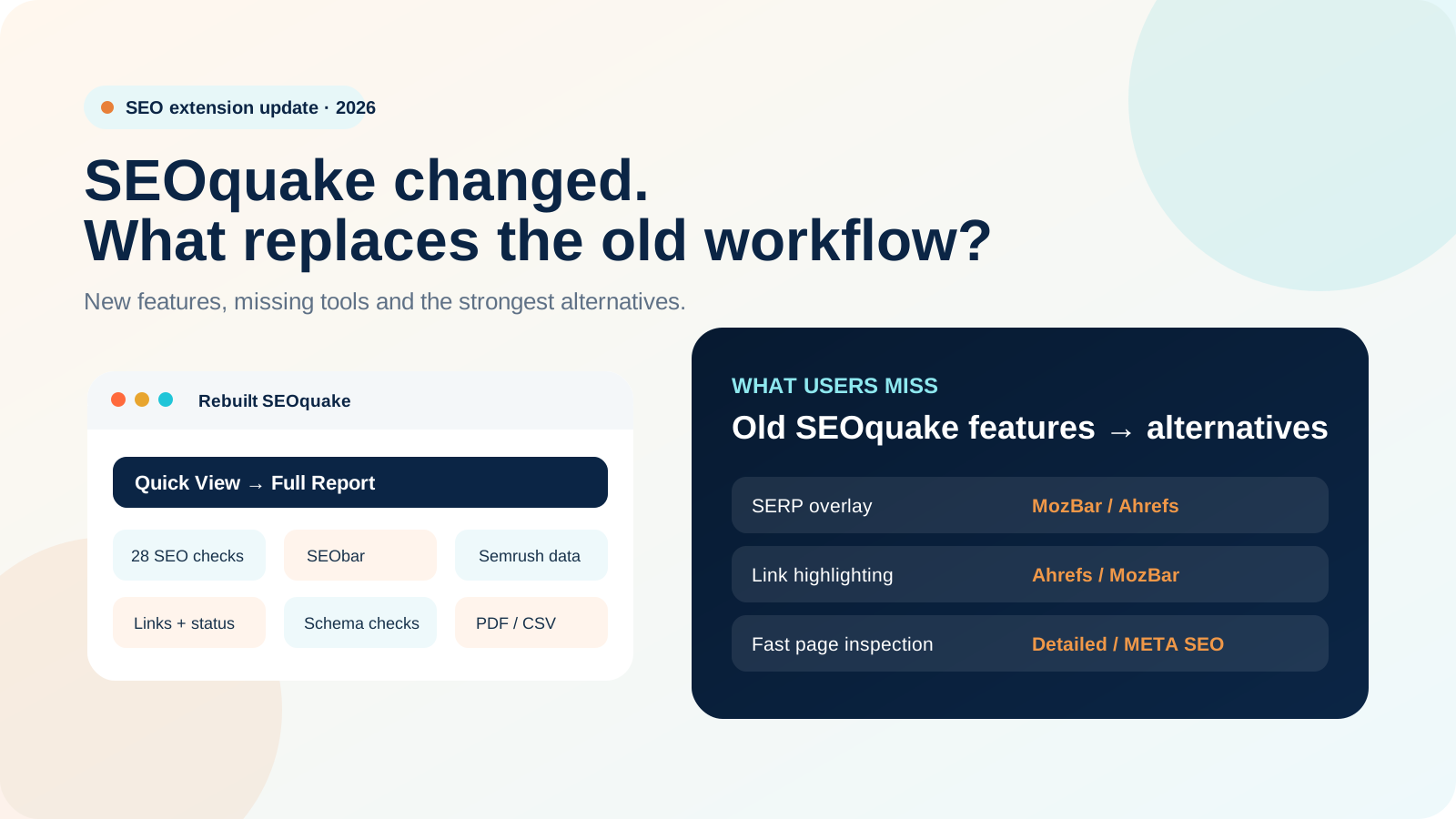
If SEOquake suddenly feels unfamiliar, you are not imagining it. Semrush rebuilt the extension in September 2026. The new version still handles quick page-level SEO checks, but the interface is different, several legacy metrics are gone, and a few popular features such as the SERP Overlay are not part of the current release.
Quick Answer: What Changed in SEOquake?
SEOquake was rebuilt around a simpler Quick View → Full Report workflow. It now runs 28 page-level checks, brings SEObar back, improves link and schema inspection, and keeps useful Semrush data and exports. At the same time, Semrush removed old metrics that were no longer dependable. The biggest gaps for long-time users are the SERP Overlay, visual nofollow/noindex highlighting, and Firefox or Opera support in this launch.
On 10 September 2026, the Chrome Web Store listed SEOquake as version 4.1.1, updated on 7 September 2026. Semrush announced the rebuild on 9 September, so the public announcement and the store version date do not line up perfectly. That is normal during staged extension rollouts and is one reason screenshots from different users may not look identical.
The useful way to think about it is simple: the job of SEOquake has not changed much, but the way you get to the information has. It is still built for checking the page in front of you. It just does that with a cleaner, more selective set of data.
What Happened to SEOquake in September 2026?
Semrush announced the rebuilt SEOquake on 9 September 2026. Existing Chrome users did not need to reinstall anything. The extension updated through the Chrome Web Store as usual.
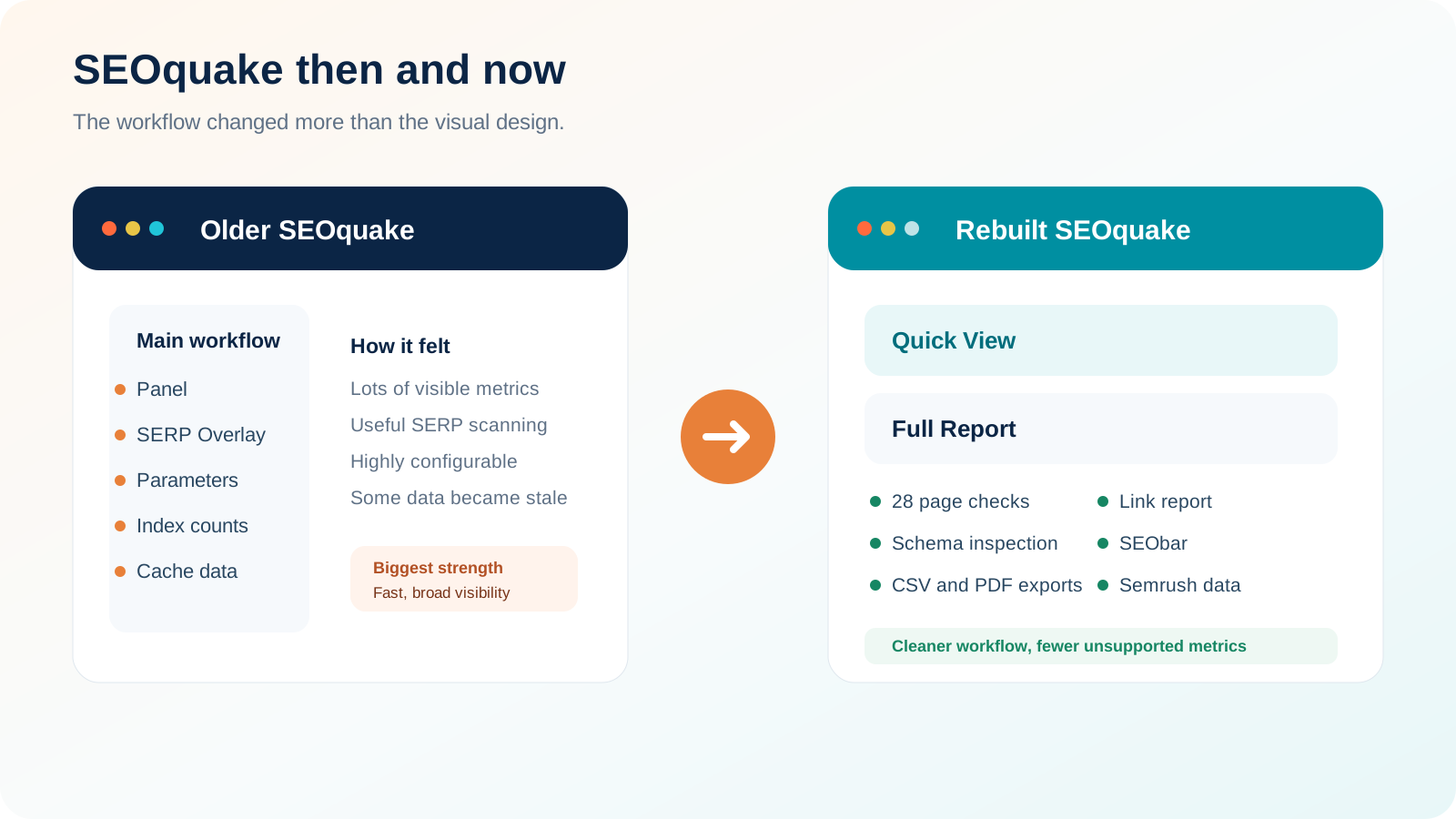
If you have used SEOquake for years, the change can feel bigger than a normal product update. The older extension had a dense Panel, lots of configurable parameters, SERP metrics, search-engine index counts, cache information and other fields that many SEOs had become used to seeing in one place.
Some of those features were genuinely useful. Others had become more like leftovers from an older SEO workflow. That is why older tutorials and screenshots now cause confusion. They describe a version of SEOquake that no longer matches the current extension.
Why Did Semrush Change SEOquake So Much?
Semrush gives a pretty straightforward reason: the old extension had reached the point where small fixes were no longer enough. It had not been rebuilt from the ground up in years, some metrics depended on data sources that had stopped working reliably, and the interface still reflected how SEO tools were designed in the early 2010s.
A good example is search-engine index counts. Some of those fields were already returning “N/A.” Google Cache information was another problem because Google retired public cache links in 2024. Leaving those fields in the extension made the interface look rich, but the data was not always useful anymore.
So the rebuild narrows the focus. Instead of trying to show everything, SEOquake now concentrates on page information you can still inspect with confidence: metadata, headings, content, links, HTTP status, indexability, schema, responsive setup, social tags and Semrush metrics where data is available.
There is also a usability story here. Semrush says SEObar was missing from the initial rebuild, users asked for it, and it came back. That is a good sign that the current product is still being shaped by how people actually use it.
What Are the New SEOquake Features?
The new SEOquake is more focused, but it is not just a basic metadata checker. For everyday page QA, several parts are actually stronger than before.
A compact popup for Page Info, Content, Audit, Schema and Semrush data.
A deeper workspace for audit findings, keyword density, links, comparisons and Semrush metrics.
Keep selected metrics visible while browsing without reopening the extension every time.
The audit expanded from 22 to 28 checks across page, technical, mobile and social signals.
Review internal and external links with anchor text, follow or nofollow state and HTTP status.
See schema types and implementation details directly inside the extension workflow.
1. Quick View and Full Report
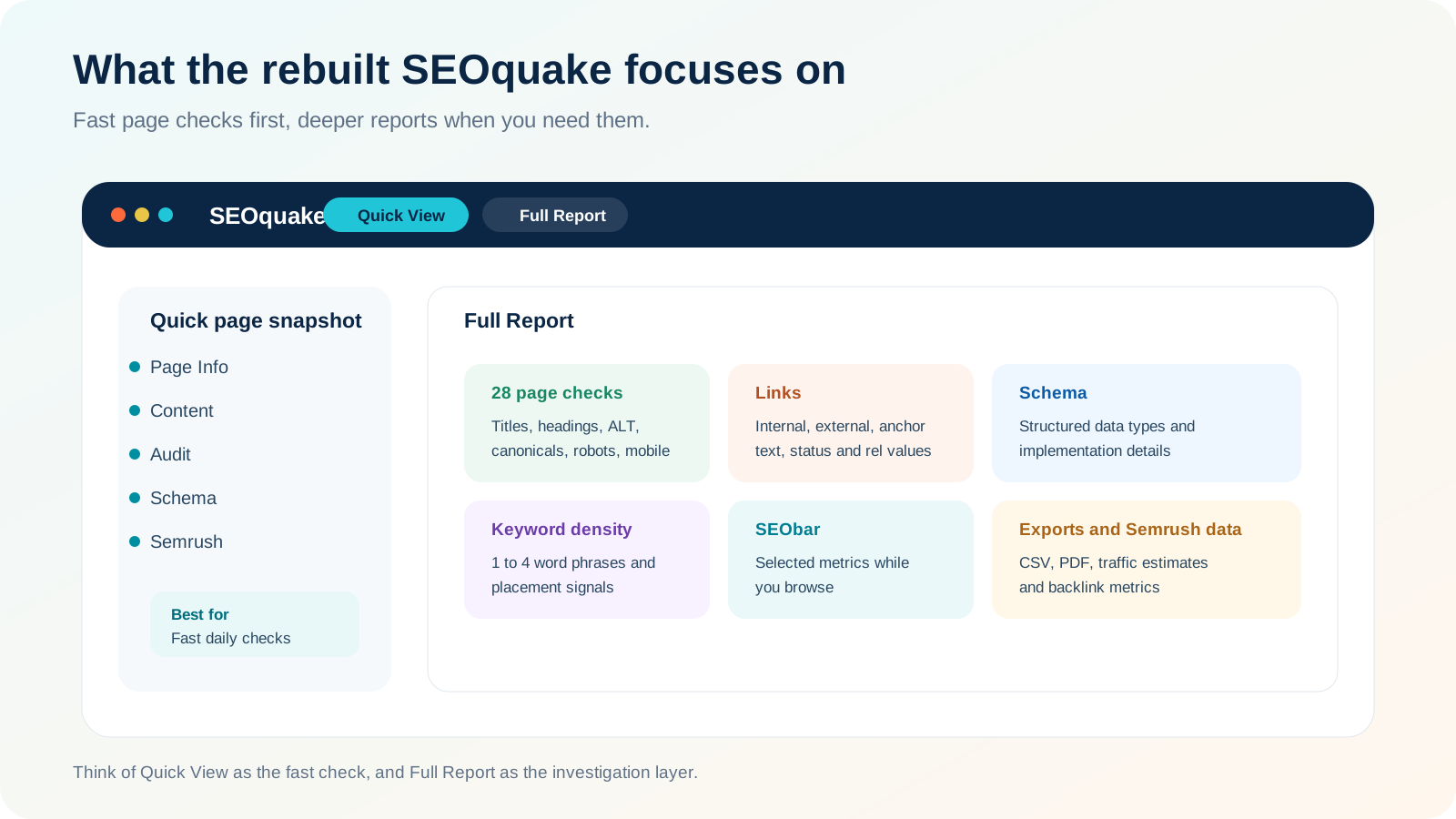
This is the biggest workflow change. The old SEOquake could feel like a wall of metrics. The new version gives you a small snapshot first, then lets you open a fuller report only when you need it.
That works well in real SEO work. If you only want to confirm a title, canonical, robots directive or schema type, you can do it quickly. If you spot a problem, then you can move into the deeper report for links, keyword data, comparisons or exports.
2. Expanded Page Audit
SEOquake now runs 28 page-level checks, up from 22 in the previous version. The checks cover title tags, meta descriptions, heading structure, image ALT attributes, URL structure, internal links, keyword density, HTTP status, HTTPS, canonicals, robots directives, Schema.org markup, viewport settings, Open Graph and Twitter Cards.
That makes it useful for pre-publish checks, developer QA and quick client reviews. It is still not a crawler like Screaming Frog or Semrush Site Audit, so it will not tell you how widespread an issue is across a whole site. It is best used as a page-level spot checker.
3. Keyword-Density Analysis Remains
SEOquake still shows frequently used terms and density for one-word through four-word phrases. It can also tell you whether those terms appear in the title, meta description or H1.
Use that data as a content signal, not as a target. There is no magic keyword-density percentage you need to hit. The report is more useful for spotting repeated wording, weak topical focus or accidental overuse.
4. Better Link Analysis
The Links report separates internal and external links and can show anchor text, follow or nofollow status and HTTP status. That is handy when you are checking navigation, internal linking, broken links or whether an important destination has accidentally been nofollowed.
One small but important point: these are links found on the page. This is not the same thing as a backlink database showing links that point to the page.
5. Semrush Metrics and Exports
SEOquake includes public Semrush metrics where data is available, including Semrush Rank, estimated U.S. organic traffic, Traffic Cost and backlink information. If you connect a Semrush account, the extension can show deeper traffic and backlink data depending on your account and subscription.
You can export Keyword Density, Links and Compare data as CSV files, and the audit can be exported as PDF. That is useful when you want to save a quick client check or move the data into a spreadsheet for further work.
What Is Missing from the New SEOquake?
This is where most of the confusion is. Some old features are gone because they stopped being useful or reliable. A few others are simply missing from this release.
Google Cache date; Google, Yahoo, Bing, Yandex and Baidu index counts; Yandex IKS; legacy checks for meta keywords, Flash, frames and microformats.
SERP Overlay; on-page nofollow/noindex highlighting; Firefox and Opera versions. Semrush has not published a return timeline.
Removed Legacy Metrics
The removal of search-engine index counts is not a major loss in practical SEO terms. Those numbers were becoming unreliable or unavailable as public data sources changed. Google Cache date had the same problem after Google removed public cache links.
So if your only reason for looking for an alternative is to get those old metrics back, we would not make that the priority. Recreating stale data is not the same as improving your workflow.
The SERP Overlay Is Currently Gone
This is the change long-time users are most likely to notice. The classic SERP Overlay placed SEO metrics beside Google results, which made it easy to compare pages and domains without opening every result.
Semrush confirms that the SERP Overlay is not included in the current rebuilt release. If you regularly scan search results for authority or SEO metrics, MozBar or Ahrefs SEO Toolbar can fill that gap more effectively right now.
On-Page Nofollow/noindex Highlighting Is Not Included
The current Links report can still tell you whether links are follow or nofollow. What is missing is the old visual highlighting directly on the webpage. Those workflows are different. A report is useful for analysis, while highlighting is faster when you want to scan a page visually.
Firefox and Opera Builds Are Not Part of This Launch
Chrome is the officially supported browser for the rebuilt release. Semrush says the Chrome extension can also install in Chromium-based browsers such as Edge, Brave and Arc, but Firefox and Opera versions are not part of the September 2026 launch.
What About Custom Parameters?
The older SEOquake documentation explains a detailed Parameters system, including custom parameters created from URLs and regular expressions. Semrush's 2026 relaunch post does not list that old workflow among the rebuilt features, and it does not give a return timeline for it either.
Because of that, we would call custom-parameter support not confirmed in the rebuilt workflow rather than saying it has been permanently removed. If custom parameters were a big part of how you used SEOquake, check your installed build before designing a new process around them.
Old SEOquake vs Rebuilt SEOquake
| Capability | Older SEOquake | Rebuilt SEOquake, Sep 2026 | What it means |
|---|---|---|---|
| Page-level audit | Available | Expanded to 28 checks | The core page-inspection job is stronger. |
| Quick popup workflow | Legacy Panel | Quick View | Faster for simple checks and less cluttered. |
| Full report | Multiple legacy tabs and reports | Redesigned | Audit, keywords, links, compare and Semrush data are grouped more clearly. |
| SEObar | Available | Available | It returned after being left out of the initial rebuild. |
| SERP Overlay | Available | Not included | You need another extension if SERP-level metrics matter to your workflow. |
| Nofollow/noindex visual highlighting | Available | Not included | Link status is still reportable, but the visual scan is missing. |
| Search-engine index counts | Available, later unreliable | Removed | Semrush removed data it could no longer report reliably. |
| Google Cache date | Available historically | Removed | The underlying public cache feature was retired. |
| Schema inspection | Legacy workflow | More prominent | Structured data is easier to inspect in the current interface. |
| PDF / CSV exports | Available in legacy reports | Available | Audit PDF plus CSV for keywords, links and comparisons. |
| Firefox / Opera | Historically supported | Not in current launch | Chrome is officially supported for the rebuilt release. |
The Best SEOquake Alternatives in 2026
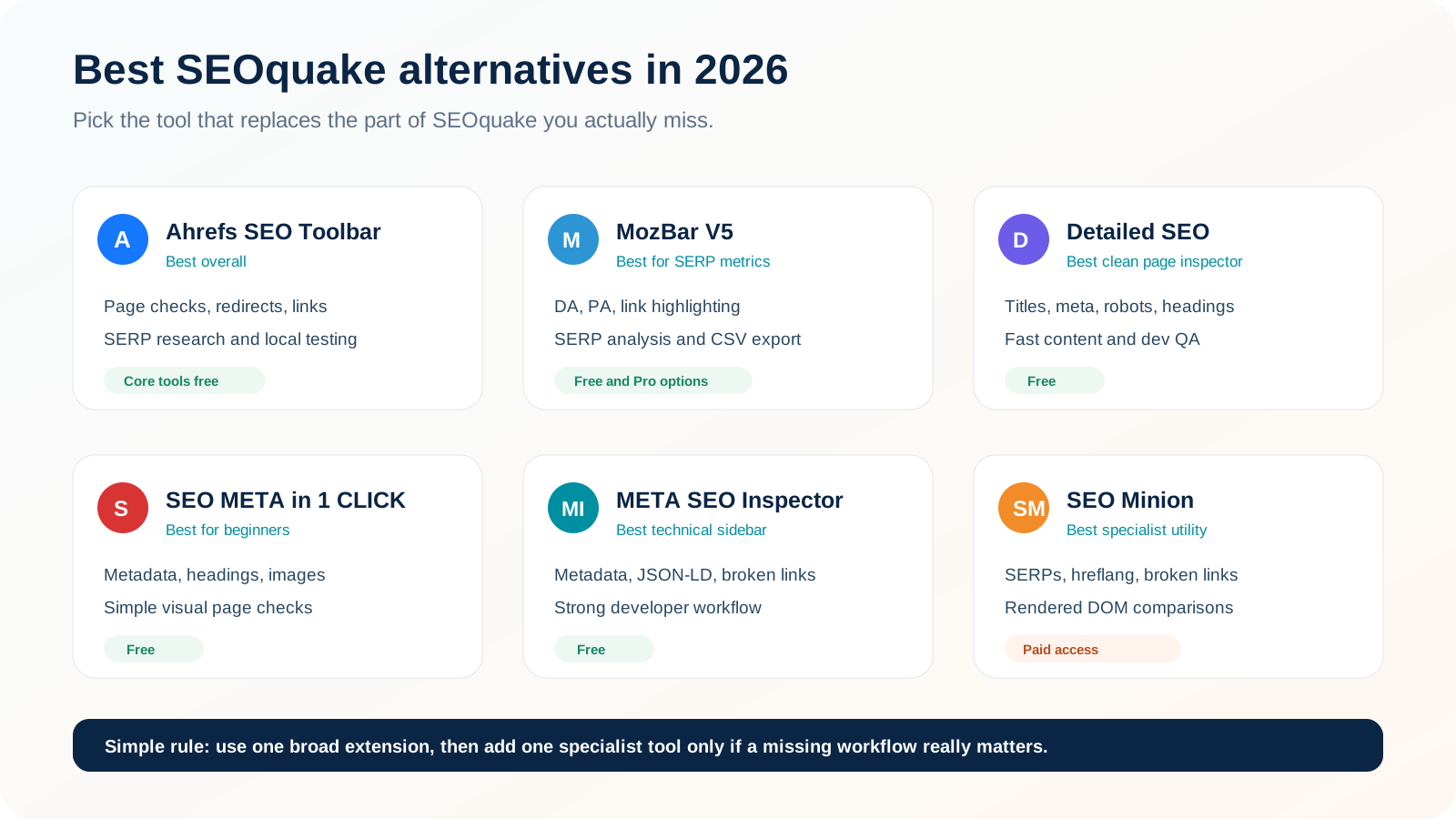
There is no perfect one-for-one replacement for old SEOquake, and that is actually useful to know. The best alternative depends on the part of SEOquake you miss.
If you miss SERP metrics, choose a SERP-focused toolbar. If you mostly check titles, canonicals and headings, use a lighter page inspector. If redirects and HTTP headers are the problem, use a technical toolbar that is stronger in those areas.
Ahrefs SEO Toolbar
Best overall SEOquake alternativeThis is the best fit if you want one extension that can handle page checks, links, redirects and SERP research.
The free toolbar includes an on-page report, redirect tracer, HTTP headers, outgoing-link reporting, link highlighting, broken-link checking, SERP positions, local search simulation, Web Vitals, keyword ideas and People Also Ask extraction.
Why it works well as a replacement: it covers several things SEOquake still does, while also filling gaps around redirects, link highlighting and SERP research. For technical spot checks, it is especially useful because redirect chains and headers are easy to inspect.
MozBar V5
Best replacement for the old SERP-metric workflowIf the old SEOquake SERP Overlay was the feature you used most, MozBar is one of the closest current substitutes.
MozBar V5 focuses on fast authority metrics, configurable docking, link summaries, on-page checks, visual link highlighting and SERP analysis with CSV export.
Best reason to install it: it recreates the idea of seeing useful SEO metrics while browsing pages and Google results, which is exactly what many long-time SEOquake users miss.
Detailed SEO Extension
Best clean one-page SEO inspectorDetailed is a great choice when you want quick answers and do not want a large toolbar getting in the way.
Detailed is intentionally focused. It pulls important page information into a compact interface instead of trying to become a full SEO platform.
Where it beats SEOquake: speed and simplicity. For checking a page during content QA, development or a client review, it often gets you to the answer faster. It does not replace the old SEOquake SERP Overlay.
SEO Meta in 1 CLICK
Best beginner-friendly metadata checkerThis is one of the easiest tools to recommend to beginners, writers and content teams.
The extension puts title length, meta description, canonical, robots, H1 to H6 headings, image ALT information, link data, Open Graph, Twitter tags, robots.txt and sitemap shortcuts into one simple interface.
Best fit: people who mainly want the “open page, check fundamentals, move on” workflow. It is not a replacement for traffic metrics or SERP authority data.
Meta SEO Inspector
Best technical metadata/sidebar alternativeMETA SEO Inspector suits people who want a more developer-friendly page inspector with strong metadata visibility.
It includes a dockable sidebar, metadata and canonical checks, heading hierarchy, image ALT data, link counts, Open Graph and Twitter data, JSON-LD inspection, character alerts and broken-link checking.
Why it is useful after the SEOquake rebuild: it keeps technical page information close to the page, which is convenient for developers and technical SEOs who like a persistent inspection workflow.
SEO Minion
Best for SERP utilities and rendered-DOM checksSEO Minion is useful when you want specialist utilities such as SERP extraction, hreflang checks, link highlighting and HTML-versus-DOM comparisons.
SEO Minion can analyze on-page SEO, highlight links, check broken links, validate hreflang, preview Google snippets, simulate locations, download SERP result types, compare raw HTML with the rendered DOM and inspect structured data.
Why it matters for former SEOquake users: its visual link tools and SERP utilities cover several practical tasks the rebuilt SEOquake does not currently provide.
SEOquake Alternatives Comparison
| Tool | Best use | SERP workflow | Links / redirects | Free access |
|---|---|---|---|---|
| Ahrefs SEO Toolbar | Best overall replacement | Strong | Strong | Core tools free; metrics vary by account |
| MozBar V5 | Authority metrics + SERP analysis | Strong | Link highlighting | Useful free/community access; Pro expands data |
| Detailed SEO Extension | Fast page inspection | Not the focus | Page-focused | Free |
| SEO META in 1 CLICK | Simple on-page checks | No SERP metrics | Page link data | Free |
| META SEO Inspector | Technical metadata + sidebar | Not the focus | Broken-link support | Free |
| SEO Minion | SERP utilities + hreflang + DOM | Strong | Strong | Paid access |
Which SEOquake Replacement Should You Use for Each Missing Feature?
Best Free Stack for Most SEO Specialists
You do not need to replace SEOquake completely. A simple free stack works well:
- Keep SEOquake for the 28-check audit, keyword density, Semrush metrics and exports.
- Add Ahrefs SEO Toolbar for redirects, headers, link highlighting, broken links and SERP research.
- Use Detailed SEO Extension when you just want a very fast metadata and page-structure check.
That is usually enough. Installing every SEO extension you find creates duplicate reports, slows your browser and makes simple checks harder than they need to be.
Best Stack If the Old SERP Overlay Was Your Favorite Feature
Use MozBar for SERP-level authority metrics and export, then keep SEOquake or Detailed for the page itself. That recreates a familiar workflow: scan the SERP first, open the results that deserve a closer look, then inspect the page details.
Should You Still Use SEOquake After the Rebuild?
Yes, especially if your main job is fast page-level SEO analysis. The interface has changed, and some familiar features are missing, but the rebuilt version is still useful.
Its strongest reasons to stay installed are the broad page audit, built-in Semrush metrics, keyword-density report, link report, comparison view, SEObar and PDF or CSV exports. That is a lot of practical functionality for a free browser extension.
Switch or add another tool only when you can name the workflow SEOquake no longer covers. The most common examples are SERP overlays, visual link highlighting, Firefox support, deeper redirect tracing or specialist technical checks.
Do not replace SEOquake just because the interface looks different. Start by identifying the exact feature you lost. For most SEO professionals, SEOquake + Ahrefs SEO Toolbar is a stronger combination than old SEOquake by itself. If SERP metrics matter most, add MozBar. If you want speed and simplicity, use Detailed SEO Extension.
If you are building a wider SEO toolkit, our guide to SEO, AEO and GEO audit tools compares browser checks with larger audit and AI-visibility platforms.
Frequently Asked Questions
Why did SEOquake change in 2026?
Semrush says the old extension had not been rebuilt from the ground up in years, some external metrics were no longer reliable, and the interface reflected an older SEO workflow. The September 2026 rebuild removes unsupported data and puts more attention on page-level analysis.
Is the SEOquake SERP Overlay gone?
Yes. It is not included in the September 2026 rebuilt release. Semrush has not published a timeline for its return, so people who need SERP-level metrics should use another extension for now.
Did SEOquake remove SEObar?
No. SEObar was missing from the initial rebuild, but Semrush brought it back after user feedback. The current version lets you keep selected metrics visible while browsing.
What is the best free SEOquake alternative?
Ahrefs SEO Toolbar is one of the strongest all-round free options because its core tools cover page checks, redirects, outgoing links, broken links, SERP positions and local-result simulation. Detailed SEO Extension is better if you only want a quick page inspection.
What is the closest replacement for the old SEOquake SERP Overlay?
MozBar V5 is one of the closest matches because it supports authority metrics and SERP analysis. Ahrefs SEO Toolbar is another strong option if you want broader SERP research and technical page tools.
Is SEOquake still free?
Yes. Core reports and built-in Semrush metrics work without an account. Connecting Semrush can unlock more backlink and traffic information depending on your account and subscription.
Does the rebuilt SEOquake work in Firefox?
Firefox and Opera builds are not part of the September 2026 launch. Chrome is the officially supported browser for the rebuilt release.
Can I get the old SEOquake back?
We would not recommend building a production SEO workflow around an old extension version. Some removed metrics relied on data sources that had become unavailable or unreliable, and older extension builds can miss security and compatibility updates. It is safer to recreate the missing workflow with a current tool.
Sources and Methodology
This article was checked against official Semrush and Chrome Web Store information on 10 September 2026. We also reviewed official or current product information for the alternatives listed here. Where a feature is simply absent from the current SEOquake release, we describe it as missing rather than permanently removed.
Browser-extension features and pricing can change quickly. Check the current store listing before standardizing an agency workflow or creating training material. Cresto Digital has no disclosed commercial relationship with the tools listed in this guide.
Need a Cleaner SEO Audit Workflow?
Cresto Digital can review your technical, on-page and search-visibility stack, remove duplicated tooling and turn audit findings into a prioritized implementation roadmap.
Talk to an SEO specialist →